Search this blog


Home About Contact
2009年8月31日星期一

The Colors Of Patrick Rochon  

An Interview with Patrick Rochon a photographer / light painter / performance artist whose dramatic and imaginative work continues to color the world of art.

COLOURLovers: How long have you been interested in photography, are there other mediums you explore?

Patrick Rochon: I started doing light painting in Montreal in 1992. I use to do regular photography and in my transition between New York and Tokyo, in 1997, I became a full time light painter and never looked back.

In Tokyo I started doing video light painting and live performances with light costume and video feedback. Now I want to push the multimedia and the live show to a new level creating a unique experience. Nicolas Maranda and I, started a group called Boa Labo (http://boalabo.com) and we do live interactive shows, music clips and other funky art work involving lights. We are now working on a piece called "Light Up The World" based on a quote of Buddha and involving all of you, if you want. It will spread on You Tube to create a chain of candles around the world: http://www.youtube.com/user/WorldWideWaveOfLight

CL: What was some of your original inspiration that got you started in photography and light-painting, and how has your styled developed into the work you do now?

PR: Well the truth is when I was 15 I had to chose a profession and since photography was popular in my family, I chose to go study it in college.

Light painting came after my graduation in 1991. It came to me, I tried it and like most people who do, I loved it. Now I just do what ever comes to mind, being spontaneous.

CL: How much thought and preparation goes into each photo, or is the light painting more of a spontaneous expression of your current state of mind, or that of your subject?

PR: Well like I just said it's more of a spontaneous thing but often I'll medita and see what comes to mind. Afterwards I use the inspiration from the meditation to light paint. Also I like to built momentum to give birth to a bigger creation.

2009年8月30日星期日

The Colors Of Playing Cards  

Playing cards were found in China as early as the 9th century during the Tang Dynasty (618â€"907), when relatives of a princess played a "leaf game". The Tang writer Su E  stated that Princess Tongchang, daughter of Emperor Yizong of Tang, played the leaf game with members of the Wei clan to pass the time. The Song Dynasty (960â€"1279) scholar Ouyang Xiu (1007â€"1072) asserted that card games existed since the mid Tang Dynasty and associated their invention with the simultaneous development of using sheets or pages instead of paper rolls as a writing medium. A book called Yezi Gexi was allegedly written by a Tang era woman, and was commented on by Chinese writers of subsequent dynasties.

Ancient Chinese "money cards" have four "suits": coins (or cash), strings of coins (which may have been misinterpreted as sticks from crude drawings), myriads of strings, and tens of myriads. These were represented by ideograms, with numerals of 2â€"9 in the first three suits and numerals 1â€"9 in the "tens of myriads". Wilkinson suggests that the first cards may have been actual paper currency which were both the tools of gaming and the stakes being played for. The designs on modern Mahjong tiles likely evolved from those earliest playing cards. However, it may be that the first deck of cards ever printed was a Chinese domino deck, in whose cards we can see all the 21 combinations of a pair of dice. In Kuei-t'ien-lu, a Chinese text redacted in the 11th century, we find that dominoes cards were printed during the Tang Dynasty, contemporary to the first printed books. The Chinese word pái (牌) is used to describe both paper cards and gaming tiles.

An Indian origin for playing cards has been suggested by the resemblance of symbols on some early European decks (traditional Sicilian cards, for example) to the ring, sword, cup, and baton classically depicted in the four hands of Indian statues.

2009年8月29日星期六

Tropicália Inspired Color  

"A Tropicália, Tropicalismo ou Movimento tropicalista foi um movimento cultural brasileiro que surgiu sob a influência das correntes artísticas de vanguarda e da cultura pop nacional e estrangeira (como o pop-rock e a concretismo); mesclou manifestações tradicionais da cultura brasileira a inovações estéticas radicais."

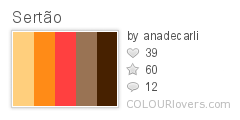
A selection of palettes from the COLOURlovers' Group Tropicalia.

Industrial Sertão

Marrocos Babylon

ConcreteWaldemar sLOWwegoFaraway

Pistachio_Berry_Cone Canary

Perigosa Alone,_together

2009年8月28日星期五

Color Inspiration: Graffiti  

New York City based Photographer Dez Santana was nice enough to share his collection of graffiti photos taken around the five boroughs. The set is full of great color compositions, and even includes some nice shots of the recent mural by Os Gêmeos, whose work inspired another post. You can see another graffiti inspired post here.

All Photos Copyright © Dez Santana Photography, All Rights Reserved

robots_will_save_us UpsideDownPeopleKnow

just_waitin drips

2009年8月27日星期四

Enabling keyboard navigation in Mac OS X Web browsers  

I like using the keyboard to navigate websites. It is often more efficient and comfortable than having to reach for the mouse and position the cursor just right. Another reason I have for using the keyboard is that it lets me check that aspect of accessibility on the sites we build at work.

One problem is that, for some strange reason, Mac OS X web browsers do not have full keyboard navigation enabled by default. They do support keyboard navigation, but you need to enable it. In some cases it’s very easy, in others it requires a bit more work.

Since I am asked about this every now and then I have written this summary of how to enable full keyboard navigation in some web browsers for Mac OS X.

Safari

  1. Choose Safari > Preferences.
  2. Click Advanced.
  3. By default, the Tab key just focuses form controls â€" you need to use Option-Tab to focus links as well. To change this, check the checkbox labelled Press Tab to highlight each item on a webpage.

Firefox

  1. Choose Apple menu > System Preferences.
  2. Click Keyboard & Mouse
  3. Click Keyboard Shortcuts.
  4. Below “Full keyboard access”, check the radio button labelled All controls.
  5. Close System Preferences and open Firefox.
  6. Type about:config in the Firefox location bar, press enter and click the “I’ll be careful, I promise!” button.
  7. Look for a setting called accessibility.tabfocus. Most likely it isn’t there, but if it is, double-click it and change its value to 7. Skip the next steps.
  8. If there is no accessibility.tabfocus setting, right-click anywhere in the list and choose New > String.
  9. In the “New string value” dialog that opens, enter accessibility.tabfocus and click OK.
  10. Enter 7 in the “Enter string value” dialog and click OK.

You may need to refresh any pages that were open in other tabs before you opened about:config for the changes to take effect.

It is worth noting that sometimes you don’t have to go through steps 6-10 to enable keyboard navigation in Firefox. It seems a bit strange, but if I create a new user profile in Firefox 3, keyboard navigation works without further configuration. If I create a new Mac OS X user, however, keyboard navigation does not work until I add accessibility.tabfocus in about.config. Why? No idea.

Opera

  1. Choose Opera > Preferences.
  2. Click Advanced.
  3. Select Shortcuts in the list of settings.
  4. Check the “Enable single-key shortcuts” checkbox.

In Opera you don’t keyboard navigate quite the same way as in other browsers. The Tab key only works with form controls. To navigate links you use the Q and A keys to step backwards and forwards through the links on the page. You can also use headings to navigate by pressing the W and S keys to step to the previous or next heading. In addition to this, Opera has something called Spatial navigation which lets you use the Shift key and the arrow keys to move around the page.

Camino

  1. Choose Camino > Preferences.
  2. Click Web Features.
  3. From the “Tab selects” menu, choose All form controls and links.

OmniWeb

  1. Choose OmniWeb > Preferences.
  2. Click General.
  3. Next to “Keyboard Navigation”, check the radio button labelled Tab key selects links and form controls.

Start loving your keyboard

Now that you know how to enable full keyboard navigation in most Mac OS X web browsers, try it out if you haven’t already â€" you may find yourself liking it. Even if you don’t, you’ll be able to check that you do not create accessibility problems for people who cannot use a mouse and rely on their keyboard to navigate the Web.

Posted in , , .


2009年8月26日星期三

Vintage Color & Design: Typewriter Ribbon Tins  

An inspiring set of typewriter ribbon tins courtesy of UPPERCASE Gallery.


The_Webster

ROYAL_No10

secretarial

underwood_corp

2009年8月25日星期二

My First Impressions of Balsamiq  

I recently received a wireframe from a potential client outlining their plans for a new homepage, which in itself was pretty impressive. It showed that the client had knowledge of the industry as well as a good understanding about the importance of planning.

To produce this wireframe our prospective client had used a relatively new tool called Balsamiq, which aims to capture the sketchy nature of hand drawn wireframes with the utility of a GUI application. On the surface this seems like a really good idea and it obviously allowed the client to produce something relatively quickly with little or no prior experience. As such, I think a tool like Balsamiq does have a place in the non-professional market. However I think the tool has a number of fairly fundamental problems.

First off is the styling. As I mentioned Balsamiq tries to capture the sketchiness of a hand draw wireframe by using artificially wavy lines, comic icons and hand drawn fontsâ€" in this case Comic Sans.

As a designer my initial reaction was one of horror, as it should be when confronted with the use of Comic Sans on anything other than a children’s party invite. Obviously I’m being ironic here, but Comic Sans is an incredibly ugly font that offends most designers aesthetic sensibilities. That being said, I understood the logic so didn’t judge the app on it’s choice of font alone.

The logic is obviously to make the wireframes seem hand sketched so people don’t become too obsessed by the visual representation and focus on the content, hierarchy and functionality instead. Unfortunately the design for me had completely the opposite affect. Instead of feeling rough and hand drawn, these wireframes felt incredibly stylised â€" just not in a good way. In fact, rather than saying “sketch”, they said Fisher Price to me. It was as though the whole cast of Sesame Street had given up their day jobs to start careers as UX designers. I literally had images of Big Bird sitting down at his desk and designing “My First Wireframe”.

For a tool that’s supposed to communicate ideas in a clear and concise manner, this initial reaction was large and overpowering. However I struggled through, assuming is was just my own designer biases getting in the way. Sadly, the problems didn’t go away.

The stylised lines and boxed added an incredible amount of clutter on the page, while the typography proved jarring and uncomfortable to read. Even the small details like images or form elements were annoying and vied for attention. Try as I might to ignore the design and focus on the content, it kept forcing it’s way into my consciousness making the wireframes almost impossible to consume.

While a sketched line on paper feels organic and natural, unless done incredibly well it feels artificial on screen. We all know that computers are much better at drawing straight lines than sketchy ones so the whole concept felt like artifice, like a jarring attempt to recreate something natural in one medium that is completely unnatural in another. Like an uncanny valley of UX design.

Apart from the design hindering rather than aiding the comprehension of the wireframes, I think the designers and some of the champions of the tool may have missed the point of sketched wireframes. Possibly even developing a fundamental attribution problem. A UX equivalent of cargo-cultims.

There is something very natural about using hand sketched wireframes. They are incredibly quick to produce and destroy. The quality of the lines give them a human feel and, most importantly, a shared vocabulary. We all know what we’re looking at with a sketched wireframe. There’s no artifice, no duplicity and no stylisation getting in the way. They’re pure, unadulterated wireframes, just the way nature intended. However their sketchiness is a natural artefact of the drawing process. It’s not the point of their existence in the first place. In an attempt to recreate this sketchiness I believe the developers of Balsamiq have missed one of the fundamental purposes of wireframes â€" to communicate.

The purpose of a wireframe is essentially threefold.

1. As a visual tool for exploring content, hierarchy and interaction problems.
2. As a tool for sharing and communication possible solutions to stake holders.
3. As a tool for envisioning and testing the proposed experience.

Now I fully believe that the first purpose is the most important and that wireframes should be used as an ideation tool before a communication tool. So if you’re happy with the style of Balsamiq and it doesn’t inhibit your problem solving skills, then feel free to use it to work out your interaction problems. However I find that real sketching on pen and paper is much more efficient here, and it’s a nice excuse to get away from the screen for 5 minutes.

If you’re using wireframes to communicate information, I personally believe that the visual clutter of Balsamiq gets in the way and is a hindrance to comprehension. Instead, clean lines and simple typography fade into the background and allow the person using the wireframes to focus on the content and meaning rather than the presentation. As such, if you feel the need to use a GUI application, tools like OnmiGraffle are perfectly suited to this.

I’ve heard people say that clients get confused with wireframes, thinking that they are actually the final designs. In fact this is one of the reasons people suggest the sketchy nature of Balsamiq. However I don’t think the problem is in the tool, but than the way you use it. If you create extremely high fidelity wireframes using OnmiGraffle that look designed, and then don’t walk your user through the process, of course there’s a chance they’ll get confused.

I’m not a huge fan of OmniGraffle or Visio wireframes either, but that’s got nothing to do with the tool. I just think they are a bit of a halfway house between sketched wireframes and a fully interactive prototype. We occasionally use them but more often than not we’ll start with hand sketched wireframes and then move onto HTML/CSS wireframes if we need to envisage or test complicated interactions with real users, which is actually quite often.

The last problem I have with Balsamiq is also to do with it’s stylistic treatment, although this time it has nothing to do with comprehension. The wireframes produced by Balsamiq looks cheap and amateurish. This is obviously just presentation biased, bit I find it difficult to take any User Experience developer seriously if they present wireframes that look like they were developed by an early learning tool. Furthermore, I imagine a good swath of clients would feel the same way. In a time when we’re trying to build up the integrity of this profession, I wonder if tools like Balsamiq actually do more harm than good?

2009年8月24日星期一

Color In Nature: Waves  

Inspired by Nami, a book by Japanese photographer Syoin Kajii, here is a selection of wave photos for your color inspiration.

Nami by Syoin Jajii


syoin_kajii_nami_1 syoin_kajii_nami_2

2009年8月23日星期日

The 139 tracklisting  

A Blue Perspective: <p>

The 139 Mix Tape has had a great response -- particularly from the people in my car -- which is making me reconsider my ten year estimate for volume 2.

Just in case you're not into MP3s, I've also uploaded it to SoundCloud where you can stream it from within your browser.

And ... (drumroll) here's the tracklisting for those of you who were playing at home. Seems like "Rhythm is a Dancer" was the most controversial track on there :P

  1. Chemical Brothers - Block Rockin' Beats
  2. Beastie Boys - Ch-check It Out
  3. Prodigy - Smack My Bitch Up
  4. Major Lazer - Pon De Floor
  5. Adam Freeland - We Want Your Soul
  6. Mason - Exceeder
  7. Stanton Warriors - Pop Ya Cork
  8. Eric B & Rakim - I Know You Got Soul
  9. Timo Maas - Shifter
  10. Beastie Boys - Hey Ladies
  11. The Wiseguys - Ooh La La
  12. Prince - Kiss
  13. NY Connection - Bless The Funk
  14. Justin Timberlake - Like I Love You
  15. Blur - Song 2
  16. Pharell - Can I Have It Like That
  17. KRS One - Sound Of Da Police
  18. Beck - Loser
  19. Blur - Girls & Boys
  20. Arika Bambaata - Just Get Up
  21. Daft Punk - Around The World
  22. Incredible Bongo Band - Apache
  23. The White Stripes - Seven Nation Army
  24. LCD Soundsystem - Daft Punk Is Playing At My House
  25. Michael Jackson - Wanna Be Starting Something
  26. Placebo - English Summer (Freelance Hellraiser Remix)
  27. Spiller - Groovejet
  28. Crazy Penis - There's A Better Place
  29. The Avalanches - A Different Feeling
  30. Bjork - Hyperballad (Nick Galea 4 To The Floor Mix)
  31. Underworld - Dark & Long
  32. Busta Rhymes - Dangerous
  33. Scratch Massive - Girls On Top (Breaks Version)
  34. Rui Da Silva - Touch Me
  35. Massive Attack & Mos Def - I Against I
  36. Thievery Corporation - Air Batucada
  37. Chemical Brothers - Shake Break Bounce
  38. DJ Qbert - Street Fighter vs. Mortal Kombat
  39. Moby - In My Heart
  40. DJ Krush - Toh Sui
  41. Infusion - The Careless Kind (Naum Gabo Remix)
  42. Grandmaster Flash - The Message
  43. Moby - Go (Trentemoller Remix)
  44. Perasma - Swing 2 Harmony
  45. Stevie Nicks - Just Like The White Winged Dove
  46. Red Hot Chilli Peppers - Can't Stop
  47. Bag Raiders - Fun Punch
  48. Arctic Monkeys - A Certain Romance
  49. Alex Gopher - Party People
  50. Stevie Wonder - Superstition
  51. Fake Blood - Mars
  52. Groove Armada - I See You Baby
  53. The Wiseguys - Start The Commotion
  54. Mobb Deep - Got It Twisted
  55. Gorillaz - Feel Good Inc (Stanton Warriors Remix)
  56. Daft Punk - Aerodynamic
  57. LL Cool J - Feel The Beat
  58. Justice - Phantom Part 2 (Soulwax Remix)
  59. Mary J Blige - Work That
  60. The Knife - Silent Shout
  61. UNKLE - Reign (UNKLE Reconstruction)
  62. DJ Krush - Beyond Raging Waves
  63. DJ Shadow - Organ Donor
  64. Force Mass Motion - Out Of It
  65. Eazy E - Hittin' Switches
  66. Fatboy Slim - Song For Lindy
  67. DJ Shadow - Walkie Talkie
  68. Scott Grooves - Mothership Reconnection (Daft Punk Remix)
  69. Kim Carnes - Bette Davis Eyes
  70. Daft Punk - Oh Yeah
  71. MSTRKRFT - Bounce (A-Trak Remix)
  72. Friendly - Who Is Friendly
  73. Dizze Rascal - Old Skewl
  74. Eurythmics - Sweet Dreams
  75. Sugarhill Gang - 8th Wonder
  76. Stetsasonic - Talkin' All That Jazz
  77. Freestylers - Don't Stop
  78. The Ojays - For The Love Of Money
  79. Sugarhill Gang - Rapper's Delight
  80. Mr Oizo - Two Takes It
  81. David Bowie & Queen - Under Pressure
  82. Eine Kleine Nacht Musik - La Serenissima
  83. Madonna - Hung Up
  84. Isaac Hayes - Run Fay Run
  85. Steve Lawler - Courses For Horses
  86. Chemical Brothers - Leave Home
  87. New Order - Confusion (Pump Panel Reconstruction)
  88. Hot Chip - Ready For The Floor
  89. Soulwax - NY Lipps
  90. Fedde Le Grand - Put Your Hands Up For Detroit
  91. Lipps, Inc. - Funkytown
  92. The Ting Tings - Shut Up And Let Me Go
  93. Groove Armada - Easy
  94. The Cure - Love Cats
  95. A Tribe Called Quest - Can I Kick It
  96. Peter, Bjorn & John - Let's Call It Off (Girl Talk Remix)
  97. Beastie Boys - Body Movin'
  98. Stone Roses - Fool's Gold
  99. Moby - Bodyrock
  100. The Pussycat Dolls - Don't Cha
  101. Incredible Bongo Band - Slightly Reminiscent of Topsy
  102. Nalin & Kane - Beachball
  103. The Killers - All These Things That I've Done
  104. Nalin & Kane - Beachball (South Beach Vacation Mix)
  105. Lykke Li - I'm Good I'm Gone (Black Kids Remix)
  106. New Order - Crystal (Lee Coombs Remix)
  107. 4 Strings - Into The Night
  108. Depeche Mode - Only When I Lose Myself
  109. The Kills - Cheap And Cheerful (Fake Blood Remix)
  110. Coburn - We Interrupt This Program (Stanton Warriors Mix)
  111. Chemical Brothers - Life Is Sweet
  112. Basement Jaxx - Where's Your Head At
  113. John Williams - The Imperial March (Darth Vader's Theme)
  114. V/A - Star Wars Motion Picture
  115. The Doors - Break On Through
  116. The Bangles - Walk Like An Egyptian
  117. LCD Soundsystem - Disco Infiltrator
  118. Bloc Party - One More Chance
  119. Destiny's Child - Lose My Breath
  120. Noel Sanger - Designs (Remix)
  121. Snap - Rhythm Is A Dancer
  122. Liquid - Sweet Harmony
  123. Salt N Pepa - Push It
  124. Run DMC - King Of Rock
  125. Afrika Bambaata - Funky Heroes
  126. Snoop Dogg - Drop It Like It's Hot
  127. Jay-Z - Roc Boys
  128. Vanilla Ice - Ice Ice Baby
  129. De La Soul - Oooh
  130. Ultramganetic MCs - Poppa Large
  131. Usher - Yeah
  132. Kelis - Milkshake
  133. Fatman Scoop - Get Ya Hands Up
  134. Chemical Brothers - Galvanize
  135. Jungle Brothers - What You Waiting For
  136. Leftfield - Phat Planet
  137. Underworld - Born Slippy
  138. Terry Grant - I'll Kill You (Luke Chable Mix)
  139. The Knife - Heartbeats (Rex The Dog Remix)

2009年8月22日星期六

Peach Palettes  

There's nothing better than peach season here in the U.S., and having recently returned from the east coast where I ate my share of Jersey peaches I thought it would be a great idea to take a look at a selection of palettes, colors and a couple patterns from the COLOURlovers' group Peach.
Dutch_peach Slight_Sweet_Sorrow

Delicious_Peach adobe_sky

Ancestral green_goodness

Snooze-city Cute_Embarassment

Listless_Sunset Juliet